







I found CheapOair most useful when travel planning involved more than one person and nobody wanted to keep passing a laptop around. It is a free travel app from Fareportal Inc. for searching and booking flights and hotels, with access to human support at any time and a rewards offer attached to eligible activity. I tested it with the mindset of a household or shared-device user, because that is where the app’s convenience becomes most obvious—and where careful account handling matters most.
The app has been around since Sep 2, 2011, and its current version is 4.286.0. It works on devices running Android 8.0 or later, carries an Everyone age rating, and has grown to more than 5 million installs. Its 4.7 average from roughly 93 thousand ratings suggests that many travelers find the basic booking experience dependable, although a high store score should never replace checking the final itinerary and terms yourself.
How CheapOair fits into shared travel planning
My favorite use case is a household arranging a trip where one person searches, another checks dates, and someone else ultimately pays. Instead of opening separate browser tabs, I can use the app to compare flight and hotel possibilities in one place, then discuss the practical details with the people traveling. That makes it especially handy for couples, parents coordinating with older children, or friends sharing a device during a planning session.
The important distinction is that CheapOair is a booking tool, not a shared family organizer. I would not treat it as a central calendar, a group chat, or a replacement for a personal travel-document system. Its value is concentrated in finding and arranging travel. Once a household agrees on an option, I would still keep confirmation details, passenger names, identification information, and the final schedule somewhere the right travelers can access.
A realistic example is a parent and teenager planning a school-break trip. The teenager may be better at spotting convenient departure times, while the parent needs to verify the passenger details and payment information. The app makes the search stage easy to do together, but I would keep the final review and purchase with the adult responsible for the booking. That simple division avoids turning a casual shared search into an accidental commitment.
For a solo traveler, the same workflow is quicker. I can search while commuting, compare a flight with a hotel, and return to the booking process without needing a full desktop setup. The app is most appealing when speed and mobility matter. If I am planning a complicated multi-city journey with unusual luggage needs, several passengers, or strict change requirements, I become more cautious and spend extra time reading every condition before paying.
What I would check before anyone taps the final button
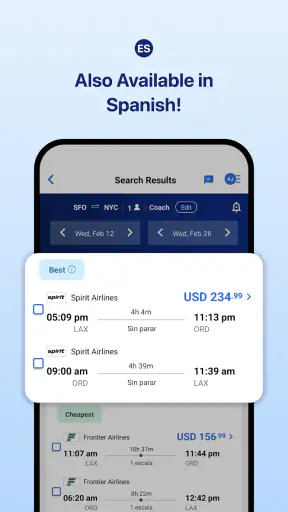
Search results can make an itinerary look simple even when the practical details are not. I would check whether the departure and arrival airports are the ones I actually want, whether a connection leaves enough time, and whether the selected hotel suits the whole group rather than only the person holding the phone. A low-looking total is not useful if the location creates expensive transfers or the schedule causes a long overnight wait.
For shared use, I also recommend saying the passenger names aloud while one person enters them. A typo is much easier to catch before purchase than afterward. The same applies to travel dates, room occupancy, and contact details. These checks are not glamorous, but they are where a travel app can create real trouble if a group rushes through the last screen.
Another useful habit is separating “research mode” from “booking mode.” During research, several people can compare options freely. During booking, one designated person should take responsibility for confirming the details and saving the result. This prevents two household members from believing that someone else completed the purchase, and it reduces the chance of duplicate bookings when several people are working from the same device.
Account boundaries matter more than the shared screen
A shared phone or tablet changes the privacy equation. I would avoid leaving an account signed in on a device that children, guests, or roommates use casually, particularly if payment or traveler information has already been entered. The app’s convenience is not a reason to blur ownership of an account. Whoever controls the account should know which bookings were made and where confirmation messages are being sent.
I also would not let a child handle the entire transaction simply because the app is rated Everyone. That age rating describes general suitability; it does not mean every booking decision is appropriate for every age. Travel purchases involve money, passenger identity, dates, and cancellation conditions. In my view, an adult should supervise the purchase even when a younger traveler helps with the search.
This is also where household roles help. One adult can be the account holder, another can review the itinerary, and the traveler can confirm personal details. That arrangement gives everyone a voice without handing sensitive booking control to every person who uses the device. CheapOair works well within that boundary because its main job is presenting travel choices and processing the booking, not managing family permissions.
I would be particularly careful on a borrowed device. After checking a trip, I would sign out where appropriate, avoid saving payment details unnecessarily, and make sure confirmation information is not visible to the next user. These are sensible precautions for any travel service, but they matter more when several people share one screen and one person may not realize what the previous user left open.
Coordinating flights and hotels without losing the human details
The ability to search flights and hotels through the same travel app is convenient for building a rough trip plan. I can think about the arrival time and lodging together instead of treating them as unrelated purchases. That is useful when the hotel’s location affects airport transfers, when a late arrival changes the preferred neighborhood, or when a group wants to reduce the number of separate booking sites involved.
Still, combining the search does not remove the need for coordination. I would have the group agree on the essentials before opening the final booking screen: acceptable departure windows, number of rooms, bed preferences, airport choices, and the maximum total each person is comfortable with. Without that conversation, an app can make it too easy for the fastest person to choose an option that quietly disadvantages everyone else.
For a household with different schedules, I would take screenshots or write down the short list before asking others to decide. I would not rely on everyone remembering a search result that may change after the app is closed. More importantly, I would label the options clearly: earliest arrival, fewest connections, best hotel location, or lowest apparent total. That turns a stream of listings into a decision the group can actually discuss.
The advertised 6X rewards angle may appeal to repeat travelers, but I would treat rewards as a secondary benefit rather than the reason to accept an inconvenient itinerary. A reward is not worth a bad connection, an unsuitable room, or a booking condition the traveler cannot live with. My rule is simple: choose the trip that works first, then consider whether the rewards make the booking more attractive.
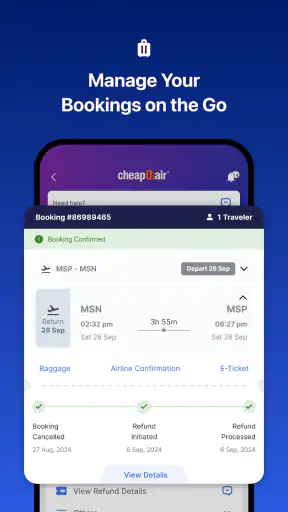
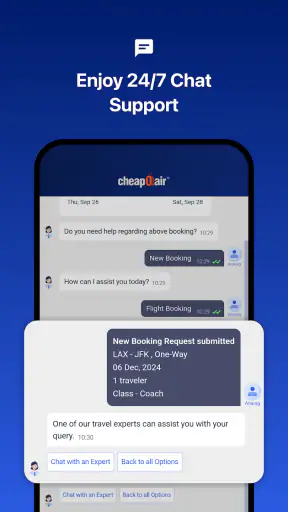
The app’s 24/7 human support is another meaningful advantage when a household is coordinating under pressure. If plans become confusing or a traveler needs help understanding a booking, speaking with a person can be more reassuring than searching through automated help pages. I would still keep the confirmation number and the exact question ready before contacting support. Human assistance is most effective when the caller can explain the itinerary precisely.
Where it beats the usual alternatives—and where it does not
Compared with booking directly through an airline, CheapOair gives me a broader starting point for comparing travel choices and adds hotel searching to the same general workflow. That is useful when I am still deciding how to travel rather than already committed to one carrier. The support option can also feel valuable for a household that prefers a person to guide the next step.
Direct airline booking can be the better choice once I know exactly which carrier and flight I want, especially if I expect changes or need airline-specific handling. The airline’s own app may provide a clearer view of that carrier’s loyalty account, onboard services, and operational updates. For a straightforward trip, reducing the number of parties involved can sometimes make later changes easier to understand.
Compared with a hotel’s own app, CheapOair is more useful during comparison shopping. A hotel’s direct channel may be preferable when I already know the property, care about its own booking terms, or want to manage a stay through the hotel brand’s ecosystem. I would compare the final conditions rather than assuming that the first displayed price represents the best overall deal.
Compared with a desktop browser, the mobile app wins on convenience but loses some screen space. When several household members are examining connection times, room details, and conditions together, a larger display may be easier. The app is better for quick checks and mobile decisions; a browser can be more comfortable for a long, complicated planning session.
Trust, age context, and the limits of shared access
The Everyone rating makes the app approachable for general household use, but travel transactions still require mature judgment. I would let a younger person explore destinations, compare departure times, or help identify a suitable hotel. I would keep payment, passenger verification, and acceptance of booking conditions with the adult who understands the consequences.
There is also a trust issue between adults. A shared account can be convenient, but it can make it unclear who changed a search, saved information, or completed a purchase. My preference is one clearly responsible account holder, with the itinerary shared separately with the actual travelers. That creates a cleaner record than allowing everyone to use the same login whenever the device is nearby.
I would not assume that every traveler sees the same information at the same time. A person who is not holding the phone may miss a baggage condition, a connection detail, or a hotel restriction. For that reason, I would read the final summary aloud to the group and send the completed itinerary through the agreed household channel. The app can start the coordination, but the people traveling must finish it together.
Privacy is another reason to avoid casual account sharing. Travel searches and bookings can reveal destinations, dates, names, and contact details. On a family tablet that is used by children, I would close the app after planning and keep confirmations out of general view. On a roommate’s device, I would be even stricter and avoid storing anything that another person does not need to see.
Small workflow choices that make the app more useful
My first practical tip is to search with the whole trip in mind, not only the cheapest-looking departure. A flight that arrives late may force a more expensive transfer or make hotel check-in awkward. I compare the arrival time with the lodging location before deciding that a result is genuinely attractive.
My second tip is to assign one person to read conditions while another checks the itinerary. This two-person review is especially valuable on a shared device because the person tapping through screens can overlook small but important text. One person watches the names and dates; the other questions the practical consequences.
My third tip is to preserve a simple offline record after booking. I would write down the booking reference, travel dates, passenger names, and support contact path in a secure place. That is useful if the phone battery is low, the traveler is abroad, or the account holder is not the person standing at the airport. The app remains helpful, but a household should not depend on one screen being available at every moment.
A fourth trade-off is speed versus inspection. The app is designed to make searching feel quick, and that is good when I am comparing ordinary trips. However, speed can encourage a group to approve the first acceptable result. I get better outcomes when I slow down for the final review, particularly for multiple passengers, hotel rooms, or itineraries with connections.
Finally, I would treat support as a safety net, not as a substitute for reading. The presence of 24/7 human help is reassuring, but I still want to understand what I am buying before I contact anyone. A clear question produces a useful answer; a vague request to “fix the trip” may leave the traveler uncertain about available choices or consequences.
Who should use it and who may be happier elsewhere
I recommend CheapOair to travelers who want one mobile starting point for flight and hotel comparisons, especially when a couple or household is making the decision together. It is also a sensible fit for people who value access to human support and may appreciate the possibility of earning rewards through travel activity. The free price makes it easy to try without adding an app purchase to the planning budget.
I would be more cautious recommending it to someone who already knows the exact airline and hotel they want, has a complicated itinerary, or expects to make several changes. In those cases, booking directly with the provider may offer a simpler relationship and more specialized account management. I would also steer away from casual shared-account use, because the convenience is not worth unclear ownership of personal and payment information.
The app’s strong store reception—around 7.6 thousand written reviews alongside its broader rating history—shows that it has attracted substantial user feedback. I see that as encouraging, but not as a guarantee that every booking situation will feel effortless. Travel is full of exceptions, and the quality of the experience depends heavily on how carefully the traveler checks the itinerary and conditions.
Its age rating also makes it suitable for a household device in the sense that the app is not presented as restricted content. Even so, suitability for browsing is different from authority to purchase. That distinction is important for parents and shared households: let younger users participate in planning, but keep the financial and identity-sensitive steps with a trusted adult.
My household verdict
After using CheapOair as a travel-planning companion rather than treating it as a complete household organizer, I came away positive. It brings flight and hotel searching into a convenient mobile workflow, offers human support around the clock, and can make group planning less scattered. I especially like it for the early and middle stages of a trip, when the main challenge is comparing realistic options with other people.
My recommendation comes with a clear boundary: use the app collaboratively, but do not make the account and booking process ownerless. Decide who is responsible, review passenger and hotel details together, and keep the finished itinerary available to every traveler who needs it. Those habits solve the main shared-device risks without taking away the app’s convenience.
For a simple family getaway, a couple comparing flights, or a traveler who wants mobile access to both air and hotel searches, I think it is worth trying. For a highly complex trip or a booking likely to require specialized changes, I would compare the direct airline or hotel option before committing. CheapOair is strongest when it helps a household make a clear travel decision, not when it is asked to replace careful communication and personal responsibility.


